Showing posts with label promotion blog. Show all posts

Browse > Home / / Where I Find Free Directories?


Where I Find Free Directories?

2 comments
Friday, December 18, 2009 Posted by One-4-All

Free Directories

Traffic, traffic and traffic. That is the most important thing for anybody who have sites. Many people drive a traffic into their blog with a lot of ways. They promote in microblogging sites (like a twitter), social networking (like a Facebook, Stumbleupon, Digg, etc), or in directories. There are two type directories, free directories and paid directories. Free directories is the most people looking for. It is not cost, but it need a long time to approve and listed our blog into their directories. When you use free directories for your blog, you must add their link into your blog.

I have blogging to find how to promote our blog with effectively, and i find 3000 Free Directories List. Oh great, i can submit my blog to many directories. But, of course it will be take a big effort. You want to see this list? here the list, List of 3000 Free Directories

But of course it doesn't the one to make your sites get a lot of traffic. Content and of course your sites design also have a significant effect too. Give your visitor a nice and informative content. Nice cache, nice looking and nice navigation will be make your visitor stay in long time and explore your sites. I hope my blog can be like that.

Read More

Browse > Home / / 7 Reasons Why We Need Use Social Media


7 Reasons Why We Need Use Social Media

3 comments
Saturday, October 03, 2009 Posted by One-4-All

If you think Twitter, Facebook, and other online social media communities are only for teens, you're missing out on valuable and free marketing platforms for your brand (book, business or product).

Further, if you're not on social bookmarking media, you're risking losing your potential clients/customers to those smart business people who are utilizing social media.

Which social media platforms you focus on depends a great deal on what your brand is. Here are seven excellent reasons why you must use social media no matter what you are promoting:

  • Reason 1: It's the Most Cost-Effective Online Advertising

  • The current most popular social media platforms being used for business are free: Twitter.com, Facebook.com and LinkedIn.com. (LinkedIn does have an upgrade that costs, but it's not necessary to get this upgrade.) And this is "relationship" marketing to targeted markets. "Free" is definitely more cost-effective than spending money on online advertising techniques such as Pay Per Click or banner ads.

  • Reason 2: You Can Have Global Reach With Social Media

  • The world is now a global marketplace. Why not reach this global market? Many of the most popular social media platforms have this global reach, and you can see this clearly illustrated on Twitter. At any time of day or night you can see real-time "tweets" from people in Japan, England, the U.S., India and many other countries.

    For example, if you have a book that might appeal to anyone in the world who reads in English, why limit yourself to just promoting in the U.S.? Thanks to Amazon people outside the U.S. can buy your book even if it is only available in U.S. stores.

  • Reason 3: You Can Attract Targeted Groups of People as Potential Clients/Customers for Your Brand

  • Social media enables you to join groups of people with the same interests and goals. On LinkedIn and Facebook you can join groups as varied as Children's Book Writers to eMarketing. If you choose groups to join based on your brand, you'll be putting yourself in front of the exact groups of people you want to reach as potential clients/customers. This can pay off in increased sales for you.

  • Reason 4: You Can Form A Community by Using the Community Aspect of Social Media

  • Once you are active on social media platforms and have people who are your followers (Twitter), your friends (Facebook) and/or your connections (LinkedIn), you can start groups of highly targeted interests. You can create a niche market in your brand, book or business and share your knowledge with others who join your community.
    Top Positions in the Web's Largest Article Directory
    These people can become your loyal followers, friends and connections - and they can help spread your marketing message to their followers, friends and connections.

  • Reason 5: You Can Use Social Media to Establish Your Expertise

  • People like to do business with people they know, like and trust. By sharing your knowledge for free online with the people in the social media groups you belong to, you can establish yourself as an expert. This can pay off in increasing potential clients/customers' trust in you.

    And you can also receive invitations for blog "interviews" or BlogTalkRadio show interviews or podcasts. And these interviews lead to more free exposure for your brand and more free exposure for your expertise.

  • Reason 6: You Can Use Social Media to Find Cross-Promotional Partners

  • Amazingly in the world of social media, people who would be considered competitors in the off-line world are teaming up to provide products and services to their combined clients/customers.
    And these clients/customers are very responsive to these cross-promotions (often called joint ventures) - especially when introduced to a second expert by a first expert they already know, like and trust.
    You and your cross-promotíon partner can each get access to the other person's "list" (the names of interested clients/customers collected at a website) and thus you've greatly expanded your potential client/customer pool.

  • Reason 7: With a Few Keystrokes You Can Announce New Updates of Your Activities

  • Your updates on Twitter, Facebook or LinkedIn take seconds - and you've announced to your followers, friends and connections what you're doing or what you're offering or what you're speaking on. And there are even online applications that allow you to update your status across several of your social media accounts simultaneously. So it is as easy as 1-2-3 to keep in front of your potential clients/customers.

    In conclusion, once you become active yourself on social media platforms, you'll find many more reasons to promote your brand, book or business on social media in order to attract targeted potential clients/customers. And you'll look back at your pre-social media days and wonder how you ever did marketing without using online social media.

Best Regard
One-4-All | Blogging News and Tips

Read More

Browse > Home / / Feed Your Blog to Twitter


Feed Your Blog to Twitter

9 comments
Saturday, September 26, 2009 Posted by One-4-All

Do you use twitter to promote your blog? Yes, twitter is one of tools that can help us to promote our blog. Like as you know, Twitter is a free social networking and micro-blogging service that enables its users to send and read messages known as tweets. Tweets are text-based posts of up to 140 characters displayed on the author's profile page and delivered to the author's subscribers who are known as followers. Senders can restrict delivery to those in their circle of friends or, by default, allow open access.

We must send our post manually to twitter homepage with using twitter account or it more popular with name "Tweeting". Tweeting your new blog posts is a great way to engage your readers, and something that many on the team have taken advantage of for our own blogs. Sometime we have forget to tweet our post. For that reason some people are using ReTweet Button in their post, perhaps someone who are interesting to our post can retweet with easy ways. Now, there are another ways which automatically updates Twitter with each new blog post. This service offered by twitterfeed.com.

You must sign up first to have your's automatically twitter feed. Go to TwitterFeed.com homepage and then make your own account. You can sign in with yours Open ID. Now you can make your new feed here.
Create New Feed Buttonclick the button to start make your own feed. And then you will ask to insert your feed data and connect to your twitter account.
Connect your feed to your twitter accounttwitterfeed And then click create feed button.

Like i said before that this tool can tweet our post with automatically and help us to get more traffic. Look up for this data.
Traffic from Twitter

Best Regard
One-4-All | Blogging News and Tips

Read More

Browse > Home / / How to Read a Traffic Source Data In Google Analytics


How to Read a Traffic Source Data In Google Analytics

1 comments
Monday, September 14, 2009 Posted by One-4-All

Traffic, it is one thing that all webmasters are dreaming. Get a lot of traffic is a hope for all of webmasters, bloggers or everybody who have a site. Everybody know that big traffic is synonyms with big earn money. A site who have a bog traffic will be have a high price and opportunity in advertise program, google adsense, paid to review, or something else.
Did Your Site Have A Big Traffic?... How to know our traffic come from?.....And what thing we can get from traffic source data?


Use Google Analytics to optimize your traffic source for your site. This is a great tool to get it for your blog.
Google Analytics Traffic SourceLook up for traffic source data above. Yes, we can get a lot of more useful data from that.
  1. Which one of you have done that give a more traffic.
  2. To know that your advertising program that you have joined was give a traffic or not.
  3. To see who has linked to your site.
  • Which one of you have done that give you a more traffic.

  • To get more traffic is several ways that can do. SEO, Blogwalking, leave your comments in another blog, shoot in ShoutMix or C-box, add your blog into RSS and Blog Directories, use microblogging (twitter), or another else.
    But with traffic source data from google analytics, you can see which one is the most useful to get it. I have look my data, and the result is that the most useful to get traffic to my site is blogwalking and leave my url in shoutmix.
    Google Analytics Traffic SourceMaybe it is different result with your own, but we can more concentrate to one thing. If your traffic was come in twitter, you can more give your attention to twitter.

  • To know that your advertising program that you have joined was give a traffic or not.

  • Another ways to get a traffic is join an advertising or adsense program for your site, like a google adwords, bidvertiser, ask2link, etc. But one question is how if your advertising program doesn't give traffic? Do you still want to continue? I think the answer is "NO". So, look up for this and save your money.

  • To see who has linked to your site.

  • With Google Analytics, we can see a sites who has linked to us. There are several sites who has link to my blog. You can see how many traffic was come from that sites.
    Sites Who Was Linked

    So, don't miss it.

    Best Regard
    One-4-All | Blogging News and Tips

    Read More

    Browse > Home / / RSS & Blog Directories


    RSS & Blog Directories

    1 comments
    Sunday, September 06, 2009 Posted by One-4-All

    I was found a RSS & blog directories list when i was blogwalking in a couple day ago. Someone was told me that it can be use to get a traffic into our blog. I want to share about it, with hope we can get a lot of traffic for us.

    BLOG DIRECTORIES

    1. 5starblogs
    2. A1Weblinks reciprocal or $$$
    3. Addyourblog
    4. Allafrica
    5. All-Blogs.net fee or reciprocal
    6. Answers
    7. Autosmoto
    8. Aviva fee
    9. Biggerblogger
    10. Birminghambloggers
    11. Blawg
    12. Blawgrepublic
    13. Blloggs
    14. Blogarama
    15. Blogaz
    16. Blogburst
    17. Blogbib fee or reciprocal
    18. BlogCatalog
    19. Blogcode
    20. Blog-collector
    21. Blogs-collection
    22. Blogdir
    23. Blogdir.com
    24. Blog-directory
    25. Blogfolders
    26. Bloggapedia
    27. Bloggerhq
    28. Bloggerschoiceawards
    29. Blogexplosion
    30. Blogfinds
    31. Blogflux
    32. Blogged
    33. Bloggapedia
    34. Bloggernity
    35. Bloghints
    36. Bloghop
    37. Bloghub
    38. Blogion
    39. Blogintro
    40. Bloglines
    41. Bloglisting
    42. Blogmob
    43. Bloggernow
    44. Blogobbler
    45. Blogotion
    46. Blogrankings
    47. Blogs.com
    48. Blogsbywomen
    49. Blogscanada
    50. Blogscholar
    51. Blogsearch
    52. Blog-search
    53. Blogsearchengine
    54. Blogsrating
    55. Blogtree
    56. Blogs-collection
    57. Blogscholar
    58. Blogville
    59. Blogz
    60. Blogz
    61. Blurt It
    62. Britblog
    63. Browseblogs
    64. Chefsblogs
    65. Christiansunite
    66. BoingBoing
    67. BOTW Blog Directory fee
    68. Bulletize fee
    69. ContentsMatter
    70. Crayon
    71. Dfwblogs
    72. Directorybest
    73. Diarist
    74. Dmoz
    75. EatonWeb
    76. Ezilon
    77. Eponym
    78. Feedboy
    79. Feeddirectory
    80. Feedmap
    81. Feedmil
    82. Feednuts
    83. Flookie
    84. FindingBlog
    85. FyberSearch
    86. Geekyspeaky $$$$ or reciprocal
    87. Genwi
    88. Getblogs
    89. Globeofblogs
    90. Gnoos
    91. Gobignetwork
    92. Google
    93. Gozoof
    94. Grokodile
    95. IBlog Business Directory fee
    96. Jewishblogging
    97. Kmax
    98. Leftyblogs
    99. LSBlogs
    100. Mkeonline
    101. Mozdex
    102. Mvblogs
    103. Myblog2u
    104. Myblogdirectory
    105. Nitle blog census
    106. Nycbloggers
    107. Orblogs
    108. Outpost-earth
    109. Poddop
    110. Quickblogdirectory
    111. Rateitall
    112. SmallBusiness.com New
    113. Spicypage
    114. Sports
    115. Sportsblogs
    116. Somethingjewish
    117. Strategicboard
    118. Submitblognow
    119. Superblogdirectory
    120. The lefty directory
    121. Theblogresource
    122. Theseoking
    123. Portal.eatonwebfee
    124. Regator
    125. Scienceport
    126. Small Business Blog Dir fee
    127. SmallBusiness.com
    128. TheVital
    129. TruthLaidBear
    130. Wilsdomain reciprocal
    131. Weblogs.com
    132. Weblog directory
    133. Webloogle
    134. Websandiego
    135. Yahoo local
    136. Yahoo.com
    Blog + RSS
    1. Blogbunch
    2. Blogoriffic
    3. BlogPulse
    4. Blogstreet
    5. Feednuts
    6. Gogreece
    7. Icerocket
    8. Info-listings
    9. Photarium
    10. Rateitall
    11. Regator
    12. Today
    13. Topblogarea
    Multi-Ping-Services
    1. Pingomatic
    2. Pingoat
    3. Ipings
    RSS
    1. 2Rss
    2. 4guysfromrolla
    3. 9rules.com
    4. Allheadlinenews
    5. Automotive-links
    6. Blogcensus
    7. Blogdigger
    8. Blo.gs
    9. Bulkfeeds
    10. Chordata
    11. Crayon
    12. Daytimenews
    13. Design-feed
    14. Devasp
    15. Feed24
    16. Feedage
    17. Feedbase
    18. Feedbees
    19. Feed Burner
    20. Feedboy
    21. Feedcat
    22. Rssfeeddirectory
    23. Feedfury
    24. Feedplex
    25. Feeds4all
    26. Feedmailer
    27. Feedooyoo
    28. FeedsFarm
    29. Feedsee
    30. Feedshark
    31. Feeds2read
    32. Feedza
    33. Finance-investing
    34. Findrss
    35. Free-rss
    36. Gabbr
    37. Goldenfeed
    38. Itsmynews
    39. Jordomedia
    40. Medlogs medical feeds
    41. Millionrss
    42. Mobispine
    43. MyMSN RSS Directory submi feed to ’search’ for content
    44. News-feeds
    45. NewsGator
    46. Newsknowledge
    47. Newsnow
    48. NGOID News Network
    49. Octora
    50. Plazoo
    51. Postami fee
    52. Pressradar
    53. Purerss
    54. RDFTicker
    55. ReadAblog
    56. Readburner
    57. Redtram
    58. RocketInfo
    59. Rssbuffet
    60. Rssfeeds
    61. Rsshugger
    62. Rssmicro
    63. Rssmountain
    64. Rssmotron
    65. Search4Rss
    66. Security-protection
    67. Solarwarp
    68. Strategic Board
    69. Swoogle
    70. Syndic8
    71. Tailrank
    72. Technorati
    73. Topix
    74. Twingly
    75. Weblogalot
    76. Wingee
    77. YahooRss
    78. Xmeta
    79. Zimbo

    Best Regard

    One-4-All | Blogging News and Tips

    Read More

    Browse > Home / / Get Backlink And Premium Template


    Get Backlink And Premium Template

    8 comments
    Friday, August 21, 2009 Posted by One-4-All

    I have take a round yesterday for looking some inspirations for my site. I was blogwalking from one site into another site. And i have look a great template in some site. Oh.....it is a WP premium template. But i have used a blogspot platform and it is not compatible if i use it for my blog. But when i am read the article, it was converted into blogspot platform. So i can use it.

    Every site that i was placed when i go to blogwalking have a great pagerank. They are almost have pagerank form 2 until 4. I have dream when my new blog become get a great pagerank too.

    I want to share a premium template that i get when i was blogwalking, and of course i want to share a backlink to get more pagerank. but how to make it become true? I am think it, and i get some idea.

    I will share this premium template. But if somebody want to get this template, they must do one thing. What it is? They must re-write this article in their blog, also include my blog list on their article.

    My Blog List:I will put your link in this article too. And for the download link, i will give it in your blog comment.

    Do you have interest in this thing?

    Get a great backlink and premium template now.

    Best Regard
    One-4-All

    Read More

    Browse > Home / / Sexy Social Bookmarking


    Sexy Social Bookmarking

    10 comments
    Wednesday, July 29, 2009 Posted by One-4-All

    sexySocial bookmarking is one of the important tools to promote our blog, can be by the other person (visitor) or by self to bookmarking it. To give an easy way for our visitor if they want bookmarking our blog or our article, we can add social bookmarking feature inline our post. So, if they want to do it, just click and it will go to social bookmarking website. I was put it into my blog. And the result will be like this one. It was called "Sexy Social Bookamrking".
    sexy bookmarking
    Are you interesting? I will show you how to add this social bookmark into your blog.

    Sexy Social Bookmarking Installation

    • first step: Go to your blogger account

    • second step: Click Layout Tab

    • third step: Click "Edit HTML" Tab and check "Expand Widget Templates" option

    • fourth step: add this CSS code into your template. Add this code before ]]</b:skin>

      <style type='text/css'>
      div.sexy-bookmarks {
      height:54px;
      background:url('http://i43.tinypic.com/2ueii3t.png') no-repeat left bottom;
      position:relative;
      width:540px;
      }

      div.sexy-bookmarks span.sexy-rightside {
      width:17px;
      height:54px;
      background:url('http://i43.tinypic.com/2ueii3t.png') no-repeat right bottom;
      position:absolute;
      right:-17px;
      }

      div.sexy-bookmarks ul.socials {
      margin:0 !important;
      padding:0 !important;
      position:absolute;
      bottom:0;
      left:10px;
      }

      div.sexy-bookmarks ul.socials li {
      display:inline-block !important;
      float:left !important;
      list-style-type:none !important;
      margin:0 !important;
      height:29px !important;
      width:48px !important;
      cursor:pointer !important;
      padding:0 !important;
      }

      div.sexy-bookmarks ul.socials a {
      display:block !important;
      width:48px !important;
      height:29px !important;
      font-size:0 !important;
      color:transparent !important;

      }

      .sexy-furl, .sexy-furl:hover, .sexy-digg, .sexy-digg:hover, .sexy-reddit, .sexy-reddit:hover, .sexy-stumble, .sexy-stumble:hover, .sexy-delicious, .sexy-delicious:hover, .sexy-yahoo, .sexy-yahoo:hover, .sexy-blinklist, .sexy-blinklist:hover, .sexy-technorati, .sexy-technorati:hover, .sexy-facebook, .sexy-facebook:hover, .sexy-twitter, .sexy-twitter:hover, .sexy-myspace, .sexy-myspace:hover, .sexy-mixx, .sexy-mixx:hover, .sexy-script-style, .sexy-script-style:hover, .sexy-designfloat, .sexy-designfloat:hover, .sexy-syndicate, .sexy-syndicate:hover, .sexy-email, .sexy-email:hover {
      background:url('http://img509.imageshack.us/img509/3131/sexysprite.png') no-repeat !important;
      }

      .sexy-furl {
      background-position:-300px top !important;
      }
      .sexy-furl:hover {
      background-position:-300px bottom !important;
      }
      .sexy-digg {
      background-position:-500px top !important;
      }
      .sexy-digg:hover {
      background-position:-500px bottom !important;
      }
      .sexy-reddit {
      background-position:-100px top !important;
      }
      .sexy-reddit:hover {
      background-position:-100px bottom !important;
      }
      .sexy-stumble {
      background-position:-50px top !important;
      }
      .sexy-stumble:hover {
      background-position:-50px bottom !important;
      }
      .sexy-delicious {
      background-position:left top !important;
      }
      .sexy-delicious:hover {
      background-position:left bottom !important;
      }
      .sexy-yahoo {
      background-position:-650px top !important;
      }
      .sexy-yahoo:hover {
      background-position:-650px bottom !important;
      }
      .sexy-blinklist {
      background-position:-600px top !important;
      }
      .sexy-blinklist:hover {
      background-position:-600px bottom !important;
      }
      .sexy-technorati {
      background-position:-700px top !important;
      }
      .sexy-technorati:hover {
      background-position:-700px bottom !important;
      }
      .sexy-myspace {
      background-position:-200px top !important;
      }
      .sexy-myspace:hover {
      background-position:-200px bottom !important;
      }
      .sexy-twitter {
      background-position:-350px top !important;
      }
      .sexy-twitter:hover {
      background-position:-350px bottom !important;
      }
      .sexy-facebook {
      background-position:-450px top !important;
      }
      .sexy-facebook:hover {
      background-position:-450px bottom !important;
      }
      .sexy-mixx {
      background-position:-250px top !important;
      }
      .sexy-mixx:hover {
      background-position:-250px bottom !important;
      }
      .sexy-script-style {
      background-position:-400px top !important;
      }
      .sexy-script-style:hover {
      background-position:-400px bottom !important;
      }
      .sexy-designfloat {
      background-position:-550px top !important;
      }
      .sexy-designfloat:hover {
      background-position:-550px bottom !important;
      }
      .sexy-syndicate {
      background-position:-150px top !important;
      }
      .sexy-syndicate:hover {
      background-position:-150px bottom !important;
      }
      .sexy-email {
      background-position:-753px top !important;
      }
      .sexy-email:hover {
      background-position:-753px bottom !important;
      }

      </style>

    • fifth step: add this HTML code after <p><data:post.body/></p> into your blog. If you was used read more trick, there are 2 <p><data:post.body/></p> code in your template. You must add that code after the first code.

      <div class='sexy-bookmarks'>
      <ul class='socials'>
      <li class='sexy-delicious'><a expr:href='&quot;http://del.icio.us/post?url=&quot; + data:post.url + &quot;&amp;title=&quot; + data:post.title' rel='nofollow' target='_blank'/></li>
      <li class='sexy-digg'><a expr:href='&quot;http://digg.com/submit?phase=3&amp;url=&quot; + data:post.url' rel='nofollow' target='_blank'/></li>
      <li class='sexy-technorati'><a expr:href='&quot;http://www.technorati.com/cosmos/search.html?url=&quot; + data:post.url' rel='nofollow' target='_blank'/></li>
      <li class='sexy-reddit'><a expr:href='&quot;http://reddit.com/submit?url=&quot; + data:post.url + &quot;&amp;title=&quot; + data:post.title' rel='nofollow' target='_blank'/></li>
      <li class='sexy-designfloat'><a expr:href='&quot;http://www.designfloat.com/submit.php?u=&quot; + data:post.url + &quot;&amp;t=&quot; + data:post.title' target='_blank'/></li>
      <li class='sexy-facebook'><a href='http://www.facebook.com/sharer.php?u=&quot; + data:post.url + &quot;&amp;t=&quot; + data:post.title' target='_blank'/></li>
      <li class='sexy-twitter'><a href='http://twitthis.com/twit?url=&quot; + data:post.url + &quot;&amp;t=&quot; + data:post.title' target='_blank'/></li>
      <li class='sexy-furl'><a expr:href='&quot;http://www.furl.net/storeIt.jsp?u=&quot; + data:post.url + &quot;&amp;t=&quot; + data:post.title' rel='nofollow' target='_blank'/></li>
      <li class='sexy-syndicate'><a href='your feed URL' title='Subscribe to RSS'/></li>
      <li class='sexy-email'><a href='your email' rel='nofollow' target='_blank'/></li>
      </ul>
      <span class='sexy-rightside'/></div>

    • sixth step: Save your template

    • seventh step: Look up for the result


    That is an easy trick right? I hope you enjoy it, and don't forget to bookmark this article.

    Best Regard
    One-4-All

    Read More

    Browse > Home / / Related Post Widget


    Related Post Widget

    10 comments
    Tuesday, June 16, 2009 Posted by One-4-All

    There are a several ways to promotion our blog to public, but i classify it into two class, external promotion and internal promotion. External promotion is like register our blog to search engine, blog directory, social bookmarking web, twitter, forum and use advertise our blog. The second thing is internal promotion. What is internal promotion? Internal promotion is the ways to promotion our blog with optimization our blog, like use navigation bar, drop down archieve menu, and related posts widget. With that tools, a visitors can be easy to explore our blog. In this post, i would to explain how to make Related Posts Widget for our blog.
    I think everybody was know what the meaning of related posts. Related posts is another post that have similar topic or content to the articles that are read by visitor. For example it's look like this one.

    To install this widget, we must do some thing with our template. 1. Login to your blogger account.
    2. Go to your template layout.
    3. Go to "Edit HTML".
    4. Click the "Expand Widget Templates" option.
    5. Insert this code into your template above </head> code.

    you can adjust the width of the widgets according to the needs or circumstances template or template condition. 6. Now search this text

    Now replace the above text with this code


    7. Now scroll down still you can find ending tag for either or . Now paste the following script below the ending div / span tag.

    8. Save your template.
    9. Look up the result, and now you have Related Posts Widget.

    And the last, i want to thank for mohamed rias for the tutorial.
    Hope this useful for use. Best Regard One-4-All

    Read More

    Browse > Home / / 100 Forum DOFOLLOW


    100 Forum DOFOLLOW

    12 comments
    Friday, June 05, 2009 Posted by One-4-All

    Believe it or not......maybe this statement was on my head when i saw my pagerank increased from 0 to 3. Because age of my blog only one month. My friend also ask to me how to get it. I really don't know about it. I just write my post, get link exchange from another blog, and the last thing are visit the forum and write any question and suggest. From it, i get backlink. Forum is the easy way to get free backlink. But don't forget to know that a forum is have "DOFOLLOW" type. This thing is most important to increase our pagerank. Don't forget to leave your URL. Now i want to share some forum which DOFOLLOW type. There is a list of NOFOLLOW DOFOLLOW forum.
    1. http://forums.digitalpoint.com
    2. http://www.sitepoint.com/forums
    3. http://www.webmasterforums.com
    4. http://www.allcoolforum.com
    5. http://www.warriorforum.com
    6. http://forums.webicy.com
    7. http://thehyipforum.com
    8. http://www.webmasterforumsonline.com
    9. http://www.webmasters.am/forum
    10. http://www.webmasterforums.net
    11. http://www.devhunters.com
    12. http://www.webmaster-forum.net
    13. http://www.geekvillage.com/forums
    14. http://www.zymic.com/forum
    15. http://www.webmastershelp.com
    16. http://www.webmasterdesk.org
    17. http://www.webmasterground.com
    18. http://developers.evrsoft.com/forum
    19. http://www.websitebabble.com
    20. http://www.talkingcity.com
    21. http://www.australianwebmaster.com
    22. http://www.wtricks.com
    23. http://www.forums.webzonetalk.com
    24. http://www.htmlforums.com
    25. http://www.searchbliss.com/forum
    26. http://www.webmasterize.com
    27. http://www.webmasterserve.com
    28. http://www.freehostforum.com
    29. http://www.seorefugee.com/forums
    30. http://www.cre8asiteforums.com/forums

    There is a last of forum until 100 forum.....but i don't type in this post. If some body need it, just send email to me. Click this link...... list 100 DOFOLLOW forum

    Hope this post will useful to us & can increase our PR.
    One-4-All

    Read More

    Browse > Home / / Email Subscription Under Posting


    Email Subscription Under Posting

    0 comments
    Wednesday, May 13, 2009 Posted by One-4-All

    Email SubscriptionLast i was posted about feedburner. In my article, one of features in feedburner is "Email Subscriptions". This feature can Give your biggest fans another way to keep up with your blog or podcast feed by placing an email subscription form on your site. This feature can be put in your sidebar, footer, or another place that you want it to be placed. But there is another option, you can put it in your post. So, everyone who was read your article and like it, they can be choose to subscribe with easy way.
    To put Email Subscription option under posting, there are a couple things that must be doing.
    1. Go to your feedburner account.
    2. Copy your "Email Subscription Code" and temporary paste it in another document sheet (notepad, wordpad, word, or another else).
    3. Sign in into blogger account.
    4. Go to "LAYOUT" option.
    5. Click "Edit HTML".
    6. looking for this code.

    7. Paste your "Email Subscription Code" after that.

    The result will be like this one.


    Enjoy it
    One-4-All


    Read More

    Browse > Home / / Add social bookmarking into your blog post


    Add social bookmarking into your blog post

    3 comments
    Tuesday, May 12, 2009 Posted by One-4-All

    Social bookmarking is a method for Internet users to store, organize, search, and manage bookmarks of web pages on the Internet with the help of metadata. It's use for users save links to web pages that they want to remember and/or share or it's can be use to promoted our blog. Some people that who read our article can use this service too. Many people was bookmark our article, of course our blog can be more famous. To give an easy way for our reader who want do that, we can put social bookmarking in our post. like this one..... bloggerplugins or in this one TipsAndCara.To insert social bookmarking in our post, just do some couple things.1. Insert script code into our template after <head>
    2. Insert this one code too. first find <p class='post-footer-line post-footer-line-3'> by using ctrl+F. than just put this code below that.

    3. Save your template and look up for result.Now in each your post, there was in social bookmarking like this.


    Hope this article useful
    One-4-All

    Read More

    Browse > Home / / Google Webmaster Tools


    Google Webmaster Tools

    0 comments
    Tuesday, May 12, 2009 Posted by One-4-All

    Everyone who was used internet must be known "SEARCH ENGINE". What's Search Engine? search engine is one tool to search documents for specified keywords and returns a list of the documents where the keywords were found. Typically, a search engine works by sending out a spider to fetch as many documents as possible. Another program, called an indexer, then reads these documents and creates an index based on the words contained in each document. One of the most popular search engine is "GOOGLE SEARCH ENGINE".

    Search engines is one way the campaign or promoted our web / blog. How to indexed by search engine (in this case GOOGLE SEARCH)?. One of the answer is GOOGLE WEBMASTER TOOLS. What it is?
    Google Webmaster Tools is a no-charge web service by Google for webmasters. It allows webmasters to check indexing status and optimize visibility of their websites.
    It has tools that let the webmaster:
    * Check and set the crawl rate
    * List internal and external pages that link to the site
    * See the PageRank of your site
    * See what keyword searches on Google led to the site being listed in the SERPs, and the click through rates of such listings
    * View statistics about how Google indexes the site
    * Submit and check a sitemap
    * Generate and check a robots.txt file

    How to get this free service? there a several step to get this one. But, i think it's still simple way.
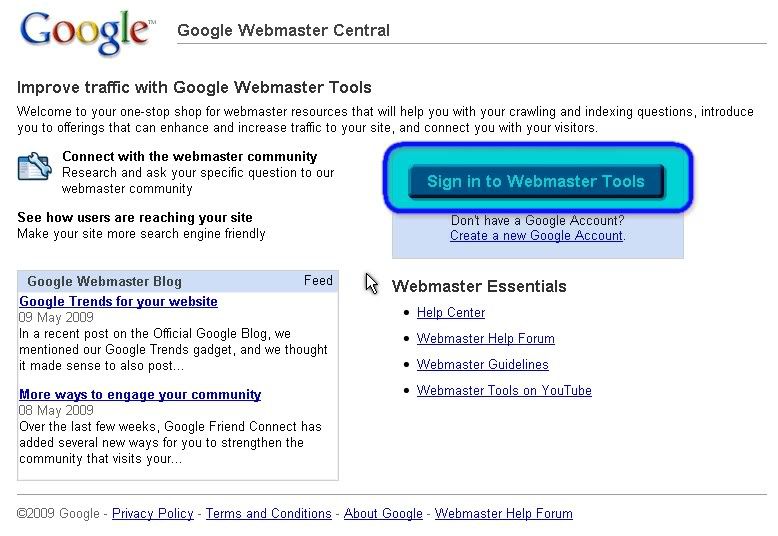
    1. Go to Google Webmaster Tools Homepage (www.google.com/webmaster)
    2. Sign In using your google account
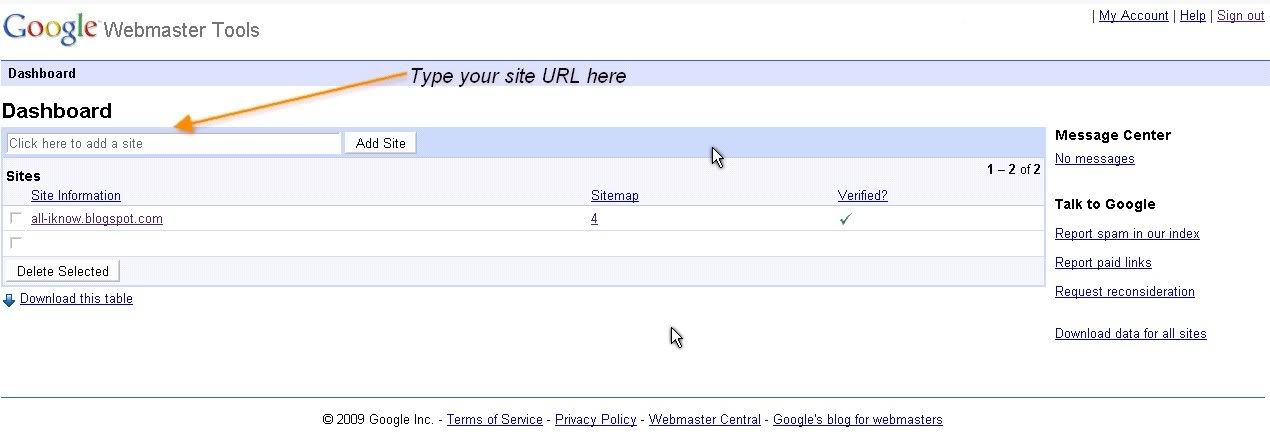
    3. Add your site (web or blog)
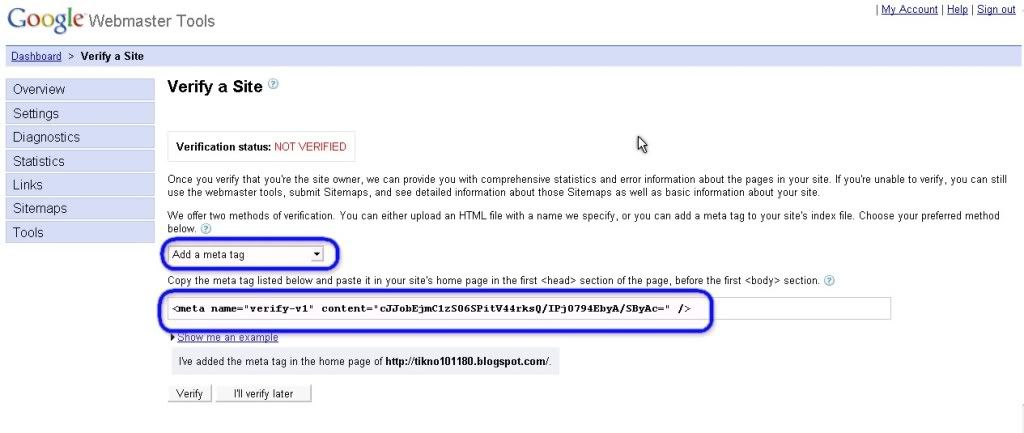
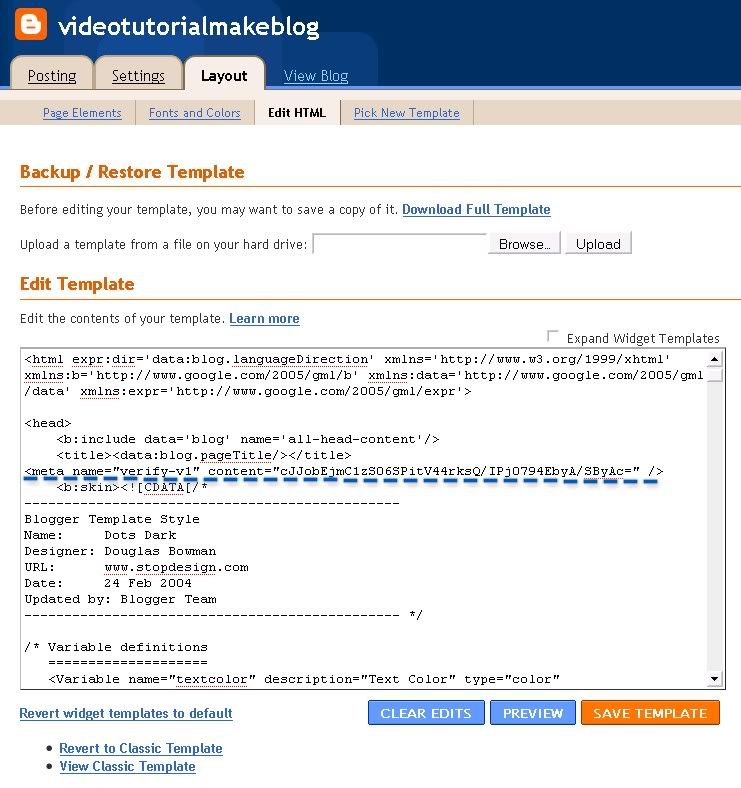
    4. Verify your site that was added on google webmaster tools ( i suggest a simple way to verify is using "Add Meta Tag Method")
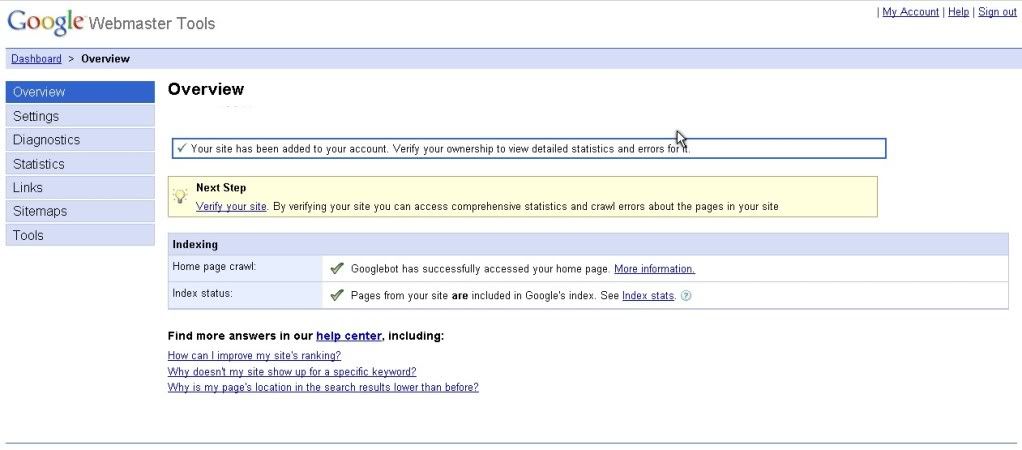
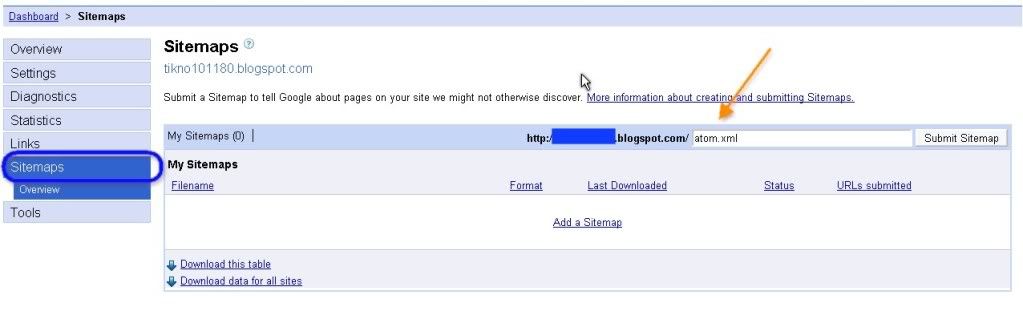
    5. Add sitemaps (add with different type of sitemaps)
    6. Waiting for a couple day until google indexing your site.

    For more information, look up for this schemes picture (click to enlarge).

    Webmaster Homepage Add Site Verify site Verify Site

    Add Meta Tag verify     Add sitemaps     Add Another Sitemaps

    (picture of step 1 ~ step 6)

    I hope this article useful for us.
    Best regard
    One-4-All

    Read More